
Paid [XTR] Trade Points System - Extra information
- Seller Offical
- Creation date
- Tags buyer feedback commerce feedback feedback management feedback system marketplace feedback reputation management reputation system seller rating trade feedback trade points trader rating trading reputation trust system user feedback user rating
Build trust in your community with a comprehensive trade feedback and reputation management system for XenForo
![[XTR] Trade Points System](/data/dbtechEcommerce/productIcons/0/186.png?1770172963)
Trade Points System: transforms your XenForo forum into a trusted trading community by enabling members to rate and review each other based on their trading experiences. Whether you run a marketplace, classifieds section, or any community where members exchange goods and services, this add-on provides the essential trust infrastructure needed for safe transactions.
With advanced fraud prevention, flexible moderation tools, and comprehensive statistics tracking, Trade Points System helps you build a transparent reputation ecosystem where honest traders thrive and problematic users are quickly identified. The system integrates seamlessly with XenForo's core features including alerts, news feed, reactions, and search, providing a native experience for both administrators and end users.
With advanced fraud prevention, flexible moderation tools, and comprehensive statistics tracking, Trade Points System helps you build a transparent reputation ecosystem where honest traders thrive and problematic users are quickly identified. The system integrates seamlessly with XenForo's core features including alerts, news feed, reactions, and search, providing a native experience for both administrators and end users.
Pricing information
- 6 Months
- $45.00
- Renewal cost
- $33.75
- 1 Year
- $65.00
- Renewal cost
- $48.75
Add-on Branding removal
- Lifetime
- $20.00
-
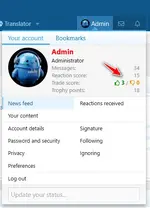 account_visitor_menu.webp
 -
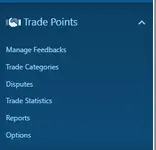 admin-menu.webp
 -
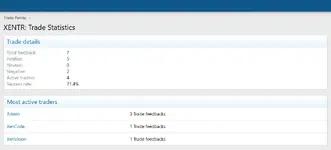 admin-statistics.webp
 -
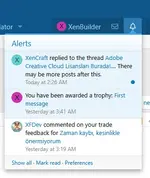 alert.webp
 -
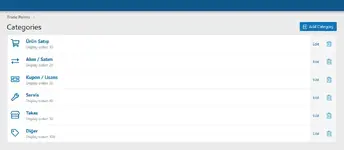 categories.webp
 -
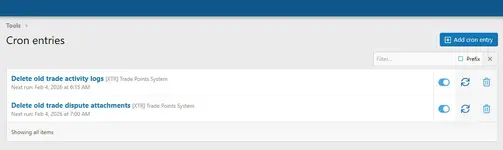 cron.webp
 -
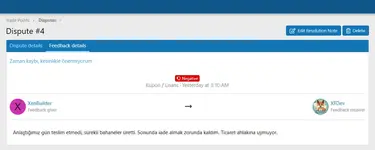 deedback-details.webp
 -
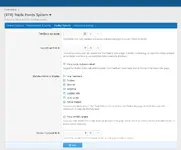 display-options.webp
 -
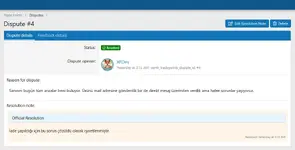 dispute-details.webp
 -
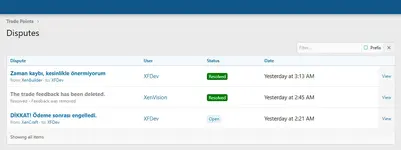 disputes.webp
 -
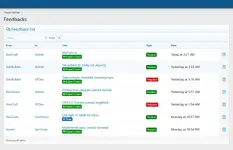 feedbacks.webp
 -
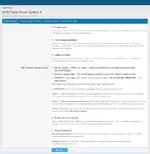 general-options.webp
 -
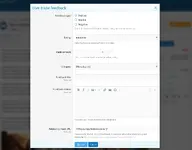 give-trade-feedback.webp
 -
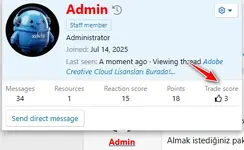 member-tooltip.webp
 -
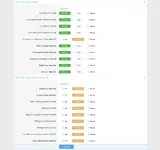 permissions.webp
 -
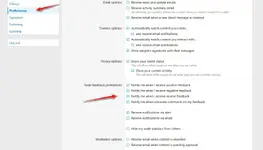 preferences.webp
 -
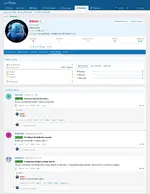 profile-page.webp
 -
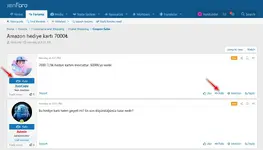 rate-button.webp
 -
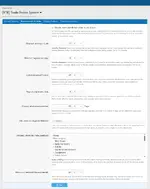 requirements-limits.webp
 -
 resource-feadback.webp
 -
 suspicious-activity.webp
 -
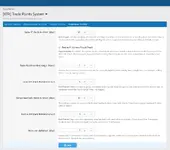 suspicious-activity-options.webp
 -
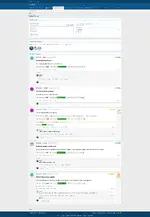 trade-system-page.webp
 -
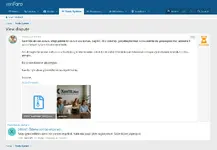 view-dispute.webp
 -
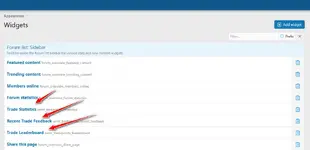 widgets.webp
 -
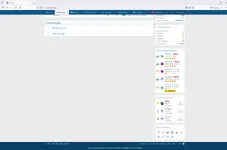 widget-view.webp
 -
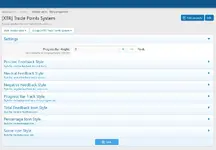 style-properties.webp


Overview Feature list Copyright info System Requirements FAQ Releases (1)
S: Kullanıcılar kendilerine geri bildirim bırakabilir mi?
C: Hayır, sistem kullanıcıların kendi hesaplarına geri bildirim bırakmasını otomatik olarak engeller. Bu, itibar manipülasyonunu önlemek için yerleşik bir güvenlik önlemidir.
S: Dolandırıcılık önleme sistemi nasıl çalışır?
C: Eklenti birden fazla dolandırıcılık önleme mekanizması içerir: Aynı ağdan kendini puanlamayı tespit eden IP eşleştirme, spam’i önleyen soğuma süreleri, şüpheli desenler için hızlı geri bildirim tespiti, anlaşma için karşılıklı olumlu geri bildirim izleme ve yeni kullanıcı korumaları. Yöneticiler her mekanizmanın hassasiyet seviyesini ayarlayabilir.
S: Kullanıcıların takas tartışma konusuna bağlantı vermesini zorunlu kılabilir miyim?
C: Evet, “Konu URL’si Zorunlu” seçeneğini etkinleştirerek kullanıcıların takasın düzenlendiği tartışma konusuna bağlantı vermesini zorunlu kılabilirsiniz. Ayrıca “Konu Başlatıcıyı Kontrol Et” seçeneğiyle kullanıcının o konuya gerçekten katıldığını doğrulayabilirsiniz.
S: Kullanıcı silindiğinde veya birleştirildiğinde geri bildirimlere ne olur?
C: Kullanıcı silindiğinde verdiği ve aldığı tüm geri bildirimler veritabanından otomatik olarak kaldırılır. Kullanıcılar birleştirildiğinde takas istatistikleri akıllıca birleştirilir ve tam takas geçmişi hedef hesap altında korunur.
S: Geri bildirimi belirli forum bölümleriyle kısıtlayabilir miyim?
C: Evet, “İzin Verilen Bölümler” seçeneğiyle takas tartışmalarının yapılabileceği forum bölümlerini belirtebilirsiniz. Geri bildirim sadece bu belirlenmiş alanlarda düzenlenen takaslar için bırakılabilir; bu düzen sağlar ve kötüye kullanımı önler.
S: Anlaşmazlık sistemi nasıl çalışır?
C: Olumsuz veya nötr geri bildirim alan kullanıcılar, geri bildirimin haksız olduğunu düşündükleri gerekçelerle resmi anlaşmazlık açabilir. Anlaşmazlıklar detaylı açıklama ve kanıt dosyası ekleme desteği sunar. Moderatörlere otomatik uyarı gider; inceleme yapabilir, belirli personele atayabilir ve anlaşmalı geri bildirimi onaylayabilir, reddedebilir veya kaldırabilir. Tüm işlemler şeffaflık için kaydedilir.
S: Geri bildirimlere kimin yorum yapabileceğini özelleştirebilir miyim?
C: Evet, üç yorum politikası seçeneği var: “Sadece Taraflar” yorumu sadece veren ve alana kısıtlar, “Taraflar ve İzinliler” taraflara ek olarak özel izinli kullanıcılara izin verir, “Herkes” ise temel yorum izni olan herkesin tartışmaya katılmasını sağlar.
S: Takas istatistikleri postbit ve profillerde görünür mü?
C: Evet, takas istatistikleri otomatik olarak kullanıcı postbit’lerinde (mesajların yanında) ve profillerde gösterilir. Sistem yüksek trafikli forumlarda bile veritabanı yükünü önlemek için performans optimizasyonu kullanır. Kullanıcılar tercihlerinden “görünmez mod”u etkinleştirerek istatistiklerini gizleyebilir.
S: Geri bildirim vermek için minimum gereksinimler koyabilir miyim?
C: Evet, minimum mesaj sayısı ve minimum hesap yaşı gereksinimleri ayarlayabilirsiniz. Örneğin, en az 10 mesaj ve en az 7 gün kayıtlı olma şartı koyabilirsiniz. Bu, tek kullanımlık hesapların sistemi kötüye kullanmasını önler.
S: İstatistikler nasıl hesaplanır?
C: İstatistikler her geri bildirimle gerçek zamanlı otomatik hesaplanır. Takas sayısı alınan geri bildirim toplamıdır. Takas puanı olumlu eksi olumsuzdur. Başarı yüzdesi (olumlu / toplam) × 100’dür. Tüm hesaplamalar performans için önbelleğe alınır ve gerekirse yönetici aracıyla yeniden oluşturulabilir.
S: XenForo Resource Manager ile çalışır mı?
C: Evet, eklenti XFRM ile yerleşik entegrasyona sahiptir. Kullanıcılar geri bildirimi belirli kaynaklara bağlayabilir, sistem kaynak URL’lerini otomatik ayrıştırarak doğru ilişkilendirme yapar. Kaynak alıp satan topluluklar için idealdir.
S: Farklı takas türleri için özel kategoriler oluşturabilir miyim?
C: Evet, sınırsız kategori oluşturabilirsiniz; her birine özel başlık, açıklama, ikon ve renk atayabilirsiniz. Örneğin “Fiziksel Ürünler”, “Dijital Ürünler”, “Hizmetler” gibi. Kategoriler geri bildirimleri düzenler ve ilgili bilgiyi bulmayı kolaylaştırır.
S: Hangi moderasyon araçları mevcut?
C: Yöneticilere filtrelemeli geri bildirim listesi, toplu işlemler, düzenleme, yumuşak/sert silme, onay kuyruğu entegrasyonu, istatistik paneli, anlaşmazlık yönetimi ve detaylı etkinlik günlüğü içeren kapsamlı yönetici paneli sunulur. Moderatörler satır içi moderasyon ile verimli toplu işlem yapabilir.
S: Kullanıcılar gönderdikleri geri bildirimi düzenleyebilir veya silebilir mi?
C: Evet, uygun izinler verildiğinde. “Kendi Düzenleme” izni olanlar geri bildirimlerini değiştirebilir, “Kendi Silme” izni olanlar kaldırabilir. Daha sıkı kontrol için bu izinleri sadece moderatörlere verebilirsiniz.
S: Soğuma sistemi nasıl çalışır?
C: Soğuma sistemi, aynı kişiye belirli bir süre içinde birden fazla geri bildirim bırakılmasını engeller. Örneğin 24 saat soğuma ile bir kullanıcı bir kişiye geri bildirim bıraktıktan sonra 24 saat beklemelidir. Bu spam ve tacizi önler.
S: Forum ana sayfasında geri bildirim gösteren widget’lar var mı?
C: Evet, üç widget dahil: Son Geri Bildirim (en yeni girişler), Takas Lider Tablosu (en yüksek puanlı tüccarlar), Takas İstatistikleri (topluluk geneli metrikler). Tüm widget’lar ayarlanabilir ve herhangi bir XenForo widget konumuna yerleştirilebilir.
S: Takas istatistiklerine göre kullanıcılara kupa verebilir miyim?
C: Evet, eklenti XenForo kupa ve yükseltme sistemlerine dört özel kullanıcı kriteri ekler: takas sayısı, takas puanı, olumlu geri bildirim sayısı ve başarı yüzdesi. Bunlara dayalı kupa veya otomatik yükseltme oluşturabilirsiniz.
S: Eklenti mobil uyumlu mu?
C: Evet, tüm sistem tamamen responsive’dir ve mobil cihazlar ile tabletlerde kusursuz çalışır. Geri bildirim bırakma, istatistik görüntüleme, yorum yapma ve anlaşmazlık açma gibi tüm özellikler dokunmatik arayüzler için optimize edilmiştir.
S: Yanlış veya kötü niyetli geri bildirimlerle nasıl başa çıkarım?
C: Birden fazla seçeneğiniz var: Kullanıcılar anlaşmazlık açabilir ve siz inceleyip çözebilirsiniz, moderatörler geri bildirimi düzeltebilir, yumuşak silme (sonra geri yüklenebilir) veya kalıcı sert silme yapabilirsiniz. Ayrıca geri bildirim sistemini kötüye kullananlara uyarı verebilirsiniz.
S: Eklenti birden fazla dili destekler mi?
C: Evet, tüm metinler XenForo ifade sistemiyle yazılmıştır ve tamamen çevrilebilir. Yönetici panelinden ifadeleri çevirebilir veya topluluk tarafından oluşturulan dil paketlerini içe aktarabilirsiniz.
Q: Can users leave feedback for themselves?
A: No, the system automatically prevents users from leaving feedback for their own account. This is a built-in safeguard to prevent reputation manipulation.
Q: How does the fraud prevention system work?
A: The add-on includes multiple fraud prevention mechanisms: IP address matching to detect users rating themselves from the same network, cooldown periods to prevent spam, rapid feedback detection for suspicious patterns, mutual feedback monitoring to identify collusion, and new user safeguards. Administrators can configure sensitivity levels for each protection mechanism.
Q: Can I require users to link to a trade discussion thread?
A: Yes, you can enable the "Require Thread URL" option which forces users to provide a link to the discussion thread where the trade was arranged. You can also enable "Check Thread Starter" to verify that the user actually participated in that thread before allowing feedback.
Q: What happens to feedback when a user is deleted or merged?
A: When a user is deleted, all feedback they gave or received is automatically removed from the database. When users are merged, their trade statistics are combined intelligently, preserving the complete trading history under the target account.
Q: Can I restrict feedback to specific forum sections?
A: Yes, the "Allowed Nodes" option lets you specify which forum sections can be used for trade discussions. Feedback can only be left for trades arranged in these designated areas, helping you maintain organization and prevent misuse.
Q: How does the dispute system work?
A: Recipients of negative or neutral feedback can file a formal dispute explaining why they believe the feedback is unfair. Disputes support detailed reasoning and file attachments as evidence. Moderators receive automatic alerts and can investigate, assign disputes to specific staff members, and ultimately approve, reject, or remove the disputed feedback. All actions are logged for transparency.
Q: Can I customize who can comment on feedback?
A: Yes, there are three comment policy options: "Parties Only" restricts comments to the feedback giver and receiver, "Parties and Permitted" allows parties plus users with special permission, and "Everyone" allows any user with basic comment permission to participate in discussions.
Q: Are trade statistics visible in postbit and profiles?
A: Yes, trade statistics are automatically displayed in user postbit areas (next to posts) and on user profiles. The system uses performance optimization to prevent database overload even on high-traffic forums. Users can also enable "invisibility mode" in their preferences to hide their statistics if desired.
Q: Can I set minimum requirements for giving feedback?
A: Yes, you can configure minimum post count and minimum account age requirements. For example, you might require users to have at least 10 posts and be registered for at least 7 days before they can leave feedback. This helps prevent throwaway accounts from abusing the system.
Q: How are statistics calculated?
A: Statistics are calculated automatically in real-time. Trade count is the total number of feedback entries received. Trade score is positive feedback minus negative feedback. Success percentage is (positive feedback / total feedback) × 100. All calculations are cached for performance and can be rebuilt using the admin tool if needed.
Q: Does this work with XenForo Resource Manager?
A: Yes, the add-on has built-in integration with XFRM. Users can link feedback to specific resources, and the system automatically parses resource URLs to create proper associations. This is perfect for communities where members sell or trade resources.
Q: Can I create custom categories for different trade types?
A: Yes, you can create unlimited categories with custom titles, descriptions, icons, and colors. For example, you might have categories for "Physical Items," "Digital Goods," "Services," etc. Categories help organize feedback and make it easier for users to find relevant information.
Q: What moderation tools are available?
A: Administrators have access to a comprehensive admin panel with filterable feedback lists, bulk actions, edit capabilities, soft and hard delete options, approval queue integration, statistics dashboard, dispute management, and detailed activity logging. Moderators can also use inline moderation for efficient bulk actions.
Q: Can users edit or delete their feedback after posting?
A: Yes, if you grant the appropriate permissions. Users with "Edit Own" permission can modify their feedback, and users with "Delete Own" permission can remove it. You can also set these permissions to moderator-only if you prefer stricter control.
Q: How does the cooldown system work?
A: The cooldown system prevents users from leaving multiple feedback entries for the same person within a specified time period. For example, with a 24-hour cooldown, a user must wait 24 hours after leaving feedback before they can leave another feedback entry for that same person. This prevents spam and harassment.
Q: Are there widgets to display feedback on the forum homepage?
A: Yes, three widgets are included: Recent Feedback (shows latest feedback entries), Trade Leaderboard (displays top-rated traders), and Trade Statistics (shows community-wide metrics). All widgets are configurable and can be placed in any XenForo widget position.
Q: Can I reward users with trophies based on their trade statistics?
A: Yes, the add-on adds four custom user criteria to XenForo's trophy and promotion systems: trade count, trade score, positive feedback count, and success percentage. You can create trophies or automatic promotions based on these criteria to reward trusted traders.
Q: Is the add-on mobile-friendly?
A: Yes, the entire system is fully responsive and works perfectly on mobile devices and tablets. All features including leaving feedback, viewing statistics, commenting, and filing disputes are accessible and optimized for touch interfaces.
Q: How do I handle false or malicious feedback?
A: You have several options: users can file disputes which you can review and resolve, moderators can edit feedback to correct inaccuracies, you can soft-delete feedback (which can be restored later), or permanently hard-delete it. You can also issue warnings to users who abuse the feedback system.
Q: Does this support multiple languages?
A: Yes, all text in the add-on uses XenForo's phrase system, making it fully translatable. You can translate all phrases through the admin panel or import language packs created by the community.
Legal Notice
As a content provider sharing platform, users of our site at xentr.net are responsible for their own posts, according to Article 8 of Law No. 5651 and Article 125 of the Turkish Penal Code (T.C.K.). All legal complaints regarding XenTR.Net will be reviewed within 3 (three) days after contacting us via the provided contact link, in accordance with the relevant laws and regulations. Necessary actions will be taken, and the site administrators will provide the necessary information.